Draft, Map & Track Compliance Policies to Regulation
A seven-step how-to for compliance teams: know which policies you need, draft or upload them, map them to the clauses they answer, review, approve, publish, and keep them current as the rules move.
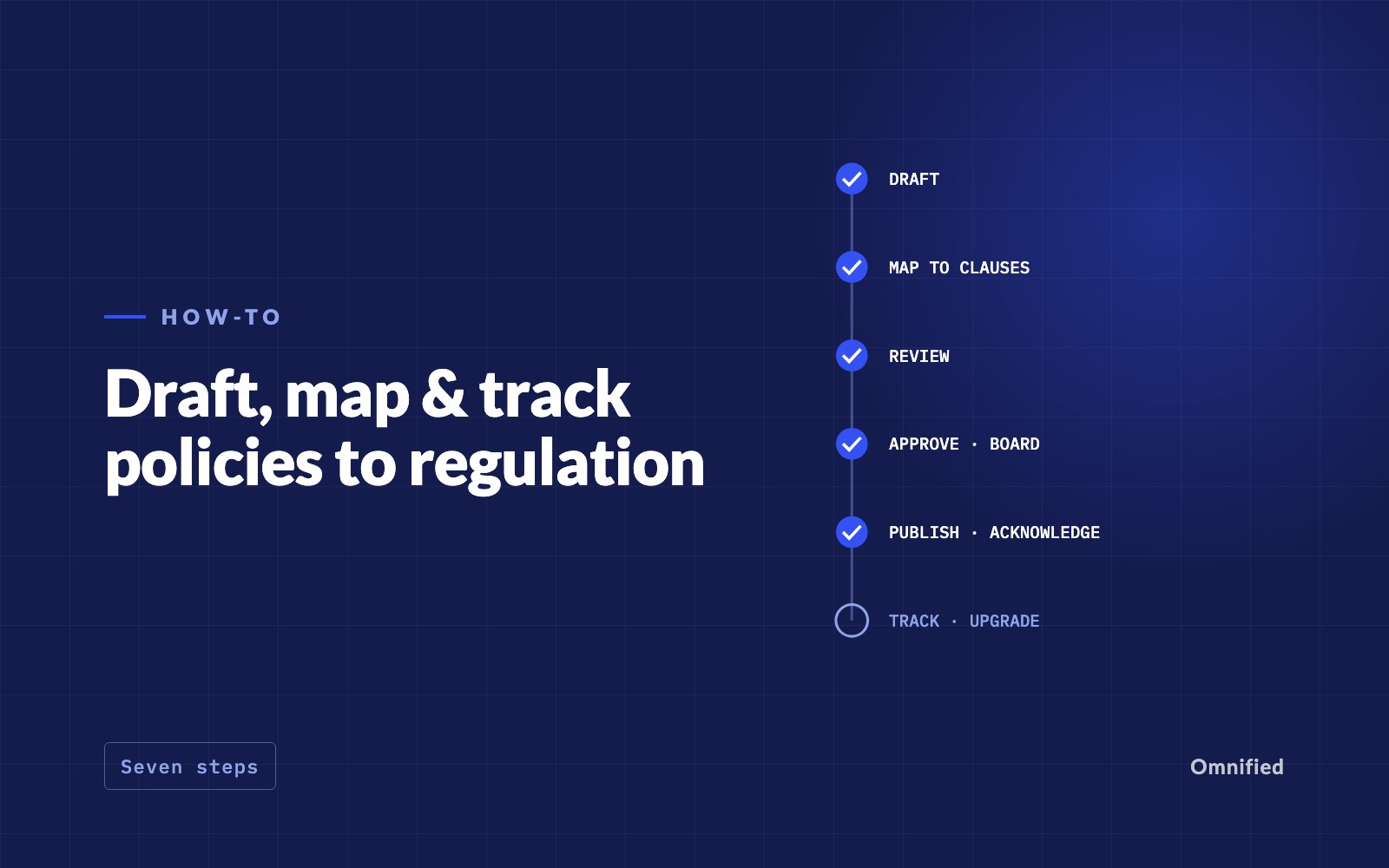
Short answer. Treat each policy as a living answer to specific rules. Start from the list of policies your regulator requires, write or upload each one, map every section to the clauses it satisfies, review and approve with a clear separation between maker and checker, publish it to the people bound by it, and track the triggers that should reopen it. The seven steps below follow that order, with what to record at each one.
The examples use Policy Register, which covers IFSCA-regulated entities in GIFT IFSC and, in Singapore, fund management companies only. The steps apply whatever tool you use.
1. Know what you must have (Blueprint)
Before drafting anything, list the policies your regulator requires of an entity like yours, and why. Each item should name the clause that mandates it, who must approve it and how often it must be reviewed. Separate what is required from what is recommended: guidance-based items are good practice, not law.
In Policy Register this list is the Blueprint, computed from your licence, activities and customers. Items that depend on a fact you have not stated, such as whether you onboard customers by video or belong to a financial group with overseas branches, are asked as yes or no questions rather than assumed. Where an instrument states no review period, the item shows the default: annual.
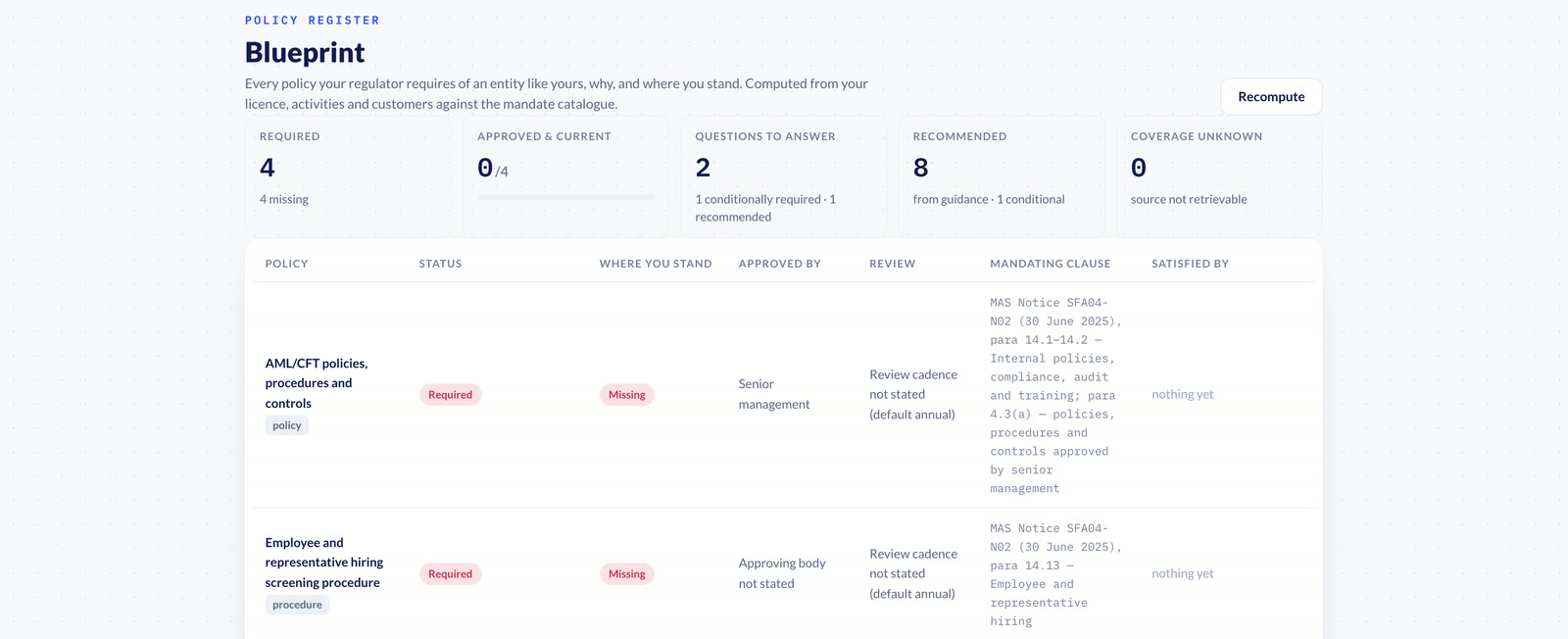
What to record at this step: for each item, the mandating clause, the approving body, the review cadence and the answer to any question it depends on. Those answers decide which policies you owe, so keep them where the next person can see why an item was marked not applicable.
2. Draft or upload
For each missing item, choose the starting point that fits:
- Draft with AI from the Blueprint item: an outline is proposed from what the policy must contain, you answer the facts only your firm can supply, and each section is drafted from the regulator's own text, with every regulator-derived sentence carrying its quote.
- Upload what you already have, as PDF, DOCX, Markdown or text. It goes to approval like any draft, and once approved it is mapped against your obligations.
- Write it by hand in the section editor, starting blank or from an earlier version.
What to record at this step: where each draft came from (the Blueprint item, an upload, or an earlier version) and every fact your firm supplied. A draft that started from a Blueprint item stays linked to it, so the Blueprint shows the item as in draft rather than missing.
Whichever route you take, the policy is structured as sections with stable identities. That matters later: a one-clause change should mean re-reviewing one section, not re-approving forty pages.
3. Map and close gaps
Mapping links each obligation to the section that meets it. Each obligation gets a verdict: covered, partial, gap or not applicable. The verdict comes from your policy text and is reviewed by your team; a person with the right role can overrule it with a written reason, and the override is recorded.
Close gaps in order of exposure. A gap on a required obligation comes before a partial on a recommended one. For each partial, read what the verdict says is missing and fix that part rather than rewriting the section. Fill gaps with AI can draft a new section for each gap or partial you choose, for your team to edit and approve. Assign each obligation an owner, so a gap is someone's task.
What to record at this step: the verdict on every obligation, the owner of every gap, and the reason for every override. An override without a reason is an opinion; with one, it is a decision an inspector can follow.
4. Review: comments, assignments, redline
Review is where the people who know the business test the text. Three habits make it work:
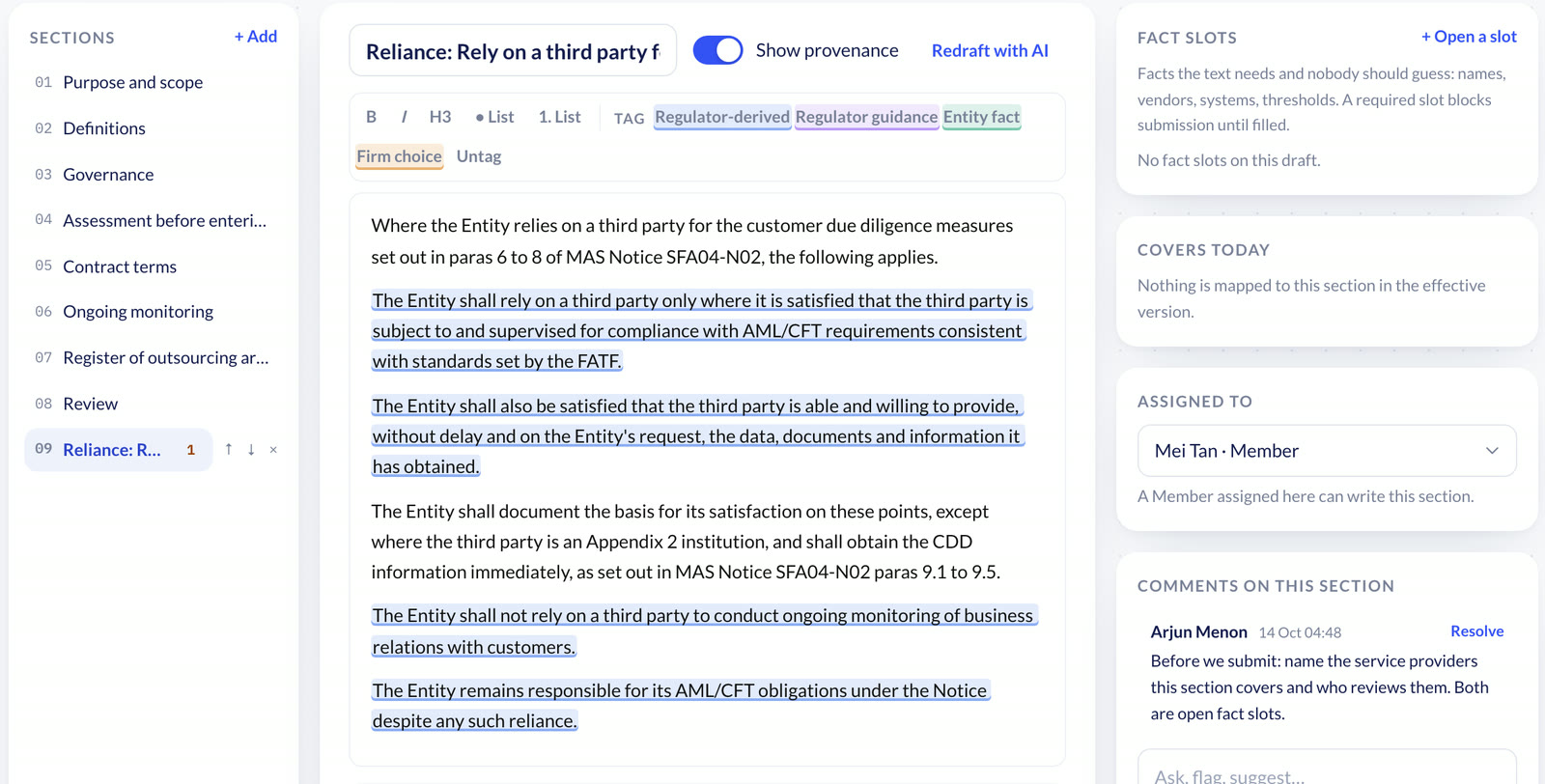
- Comment on the section, not the document. Comments in Policy Register sit on the section they are about and can be resolved.
- Assign sections to the people who own the activity. A member assigned a section can write that section, and only that one; adding, removing or reordering sections stays with administrators and compliance admins.
- Read changes as a redline against the approved version, so reviewers see what moved, not just what is there.
5. Approve: maker-checker, board resolution
Approval is a control, so it needs a separation of duties. The author of a version cannot approve it, and nor can a team member who wrote any of its sections. For a policy your regulator expects the board to approve, record the board's decision itself: the resolution and the meeting date, not only an e-mail saying it was approved. A policy approved at a meeting before it was loaded can carry that earlier approval date.
- 1AuthorCompliance reviewSubmits the draftRefused while a required fact slot is empty.
- 2Compliance reviewAuthorRequests changes, if neededThe version returns to draft with comments.
- 3Compliance reviewBoardCompletes compliance reviewThe reviewer cannot be the author, or a member who wrote part of it.
- 4BoardEffectiveApproves, with the board resolution and meeting dateThe approver signs with their typed name; the earlier version is superseded.
What to record at this step: who reviewed, who approved, when, and on what evidence. The approver's name should be tied to the exact text approved, so the record cannot later be read as approving a different version.
6. Publish and acknowledge
An approved version takes effect and the one before it is kept as superseded, with the dates it was in force. That is what answers the question an inspector asks about an old transaction: what did your policy say on that date, and who had approved it?
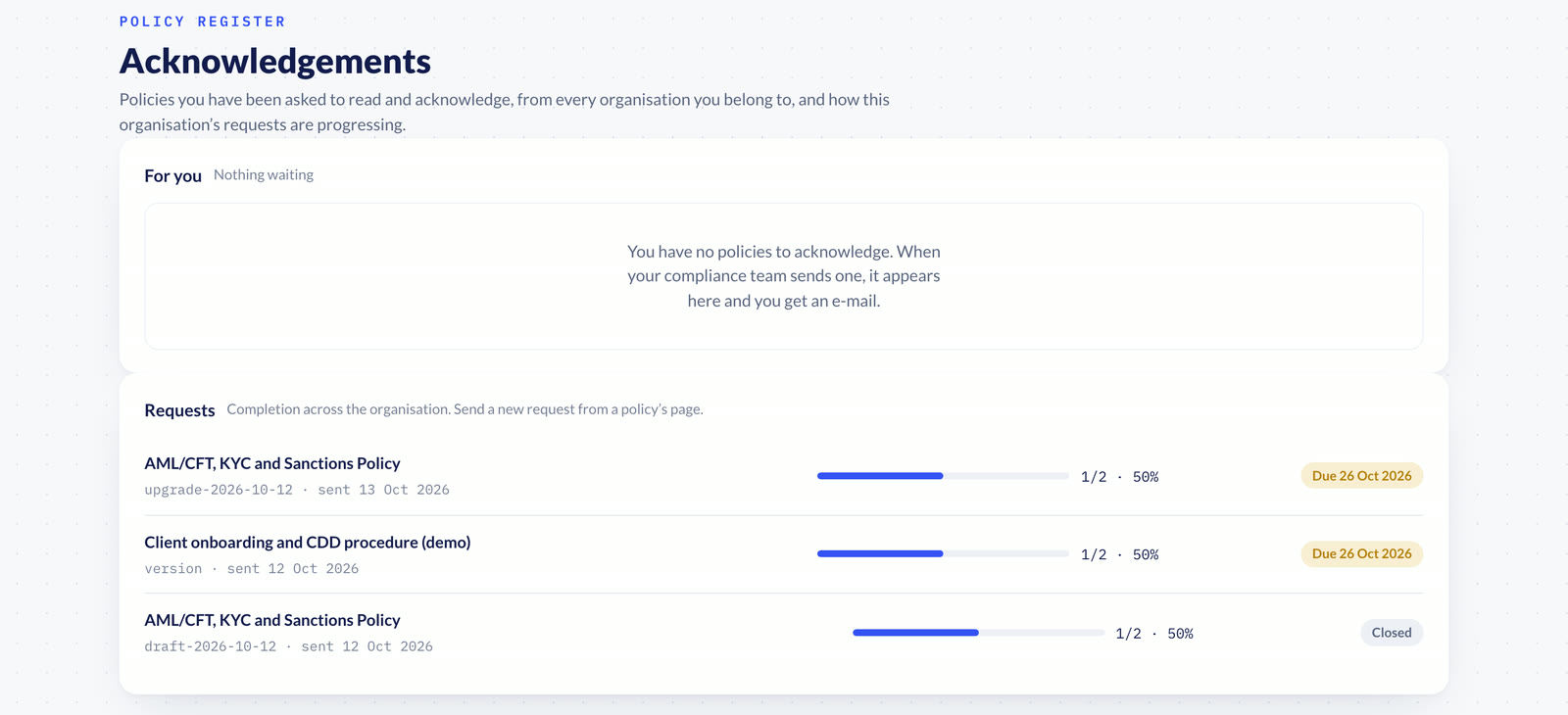
A policy only works if the people bound by it have read it. Staff acknowledgement, an add-on enabled per organisation, sends an approved or effective version to staff by role or by name, with a due date. Each person reads the text and acknowledges it with their typed name, which records the exact version they read. Reminders go out every three days while an acknowledgement is pending, and completion rates are visible to everyone.
7. Track: upgrades, review dates, gaps
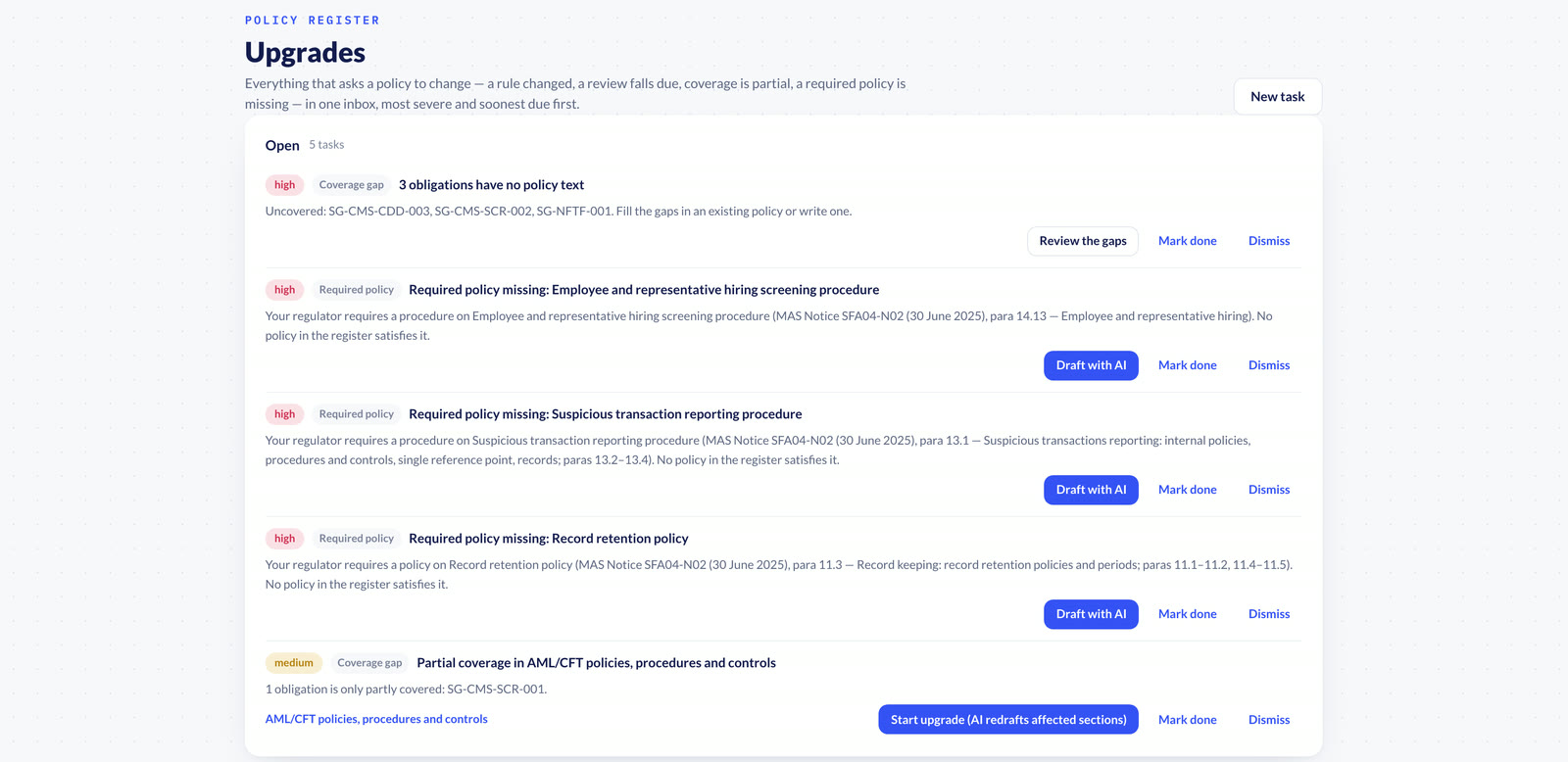
A policy goes stale for one of a few reasons, and each should open a task rather than wait for someone to notice:
- A rule your effective policy is mapped to has changed; the task is due by the change's effective date.
- A review date is within 30 days, or has passed.
- A coverage run shows partial coverage, or obligations no policy addresses.
- A required policy on the Blueprint still has nothing that satisfies it.
- Someone raises a task by hand.
What to record at this step: each trigger, when it was raised, who started or dismissed it, and why. A dismissed task with a reason shows the inspector that a change was considered; a silent one shows nothing.
Policy Register puts all of these in one upgrade inbox, prioritised by severity and due date. Tasks whose condition clears close themselves; people can start, finish or dismiss a task, and a dismissal needs a reason. Starting an upgrade creates a new draft in which only the affected sections are redrafted, and that draft goes back to step 4.
A checklist to keep
- Every required policy is listed with the clause that requires it and the body that must approve it.
- Every obligation that applies to you has a verdict, an owner and a last-checked date.
- Every override carries a reason, the person who made it and the date.
- No version took effect without a reviewer and an approver who were not its makers.
- Board-level policies carry the board resolution and meeting date.
- Staff bound by a policy have acknowledged the version in force.
- Every open trigger, from rule changes to review dates, is a task with a due date.
Policy Register
Blueprint, drafting, clause mapping, maker-checker approval and an upgrade inbox, for IFSCA-regulated entities and Singapore fund management companies.
Explore the workflow →Frequently asked questions
How often must policies be reviewed?
As often as the mandate says. Where it states no period, Policy Register defaults to an annual review. A review task opens 30 days before the date, and a policy past its date shows as overdue.
What triggers an update?
A change to a rule your effective policy is mapped to, a review date within 30 days or already past, partial coverage or uncovered obligations, a required policy that does not exist yet, or a manual request. Each opens a task in the upgrade inbox.
Who can approve?
Someone other than the version's makers, in the approval route for that policy. For a board-level policy, an administrator or compliance admin completes the compliance review and the assigned approver signs off with the board resolution and meeting date. Neither the author nor a member who wrote part of the version can approve it.
Can we discard a draft?
Yes, if it was never submitted. An administrator or compliance admin discards it with a reason; it stays in the version history marked as discarded. A version already submitted is withdrawn in Approvals instead.
Related reading
- AI policy drafting and management for fintechs
- AML policy management software for GIFT City and Singapore
- Clause-level citations in a compliance policy register
- About the author, Shubham Khandelwal
Walk through the seven steps
See each step on demo data for your regulator, with your team's questions.
Book a demo →General information, not legal advice. Screenshots show demo data for fictitious entities.
Source: Monetary Authority of Singapore (mas.gov.sg); MAS publications as obtained from the MAS website for the corpus release of 2 September 2026. For the latest version, see mas.gov.sg. Omnified is not affiliated with or endorsed by the Monetary Authority of Singapore. MAS's published text is authoritative and prevails over anything shown here; consult mas.gov.sg.
See the orchestration engine in action.
A guided walkthrough with our team.